What teams can usually answer
- Which bugs are open
- Which incidents happened
- Which issues feel painful right now
Evidence-backed bug analysis pilot
Ticket Triage connects GitLab tickets with code changes to reveal recurring defect patterns, likely failure drivers, and hotspot areas so teams can prioritize quality work with confidence.
For teams that feel recurring bug pain but need defensible evidence before committing to quality investment.
The problem
Patterns are spread across tickets, fixes, and memory, which makes prioritization hard to justify.
Without shared evidence, quality investment loses to delivery pressure.
What the pilot delivers
A product-led pilot that turns bug history into decision-ready clarity.
Bring tickets, linked fixes, and diffs together so analysis starts from real engineering history.
Surface defect patterns, systemic themes, and hotspot concentration.
Provide evidence-backed directions so teams decide what to do next.
How it works
Single system, historical window, and a structured review.
Three steps from historical bug evidence to a decision-ready readout.
Pick one team or system, set the historical window, and validate ticket-to-code linkage.
Identify recurring defect patterns, likely drivers, and hotspot areas.
Explore the outputs in-product with traceability, then wrap in a structured readout.
What you get
Engineering leaders can review, challenge, and use the results to focus their own plans.
See which patterns dominate and where impact concentrates.
Understand cross-ticket themes that cause repeat failures.
Identify code areas absorbing repeated fix effort.
In-product evidence plus summary report.
Proof
Examples of the evidence layer teams can inspect, challenge, and use.
Recurring patterns
See what actually drives bug-fix effort so planning starts from evidence, not opinion.

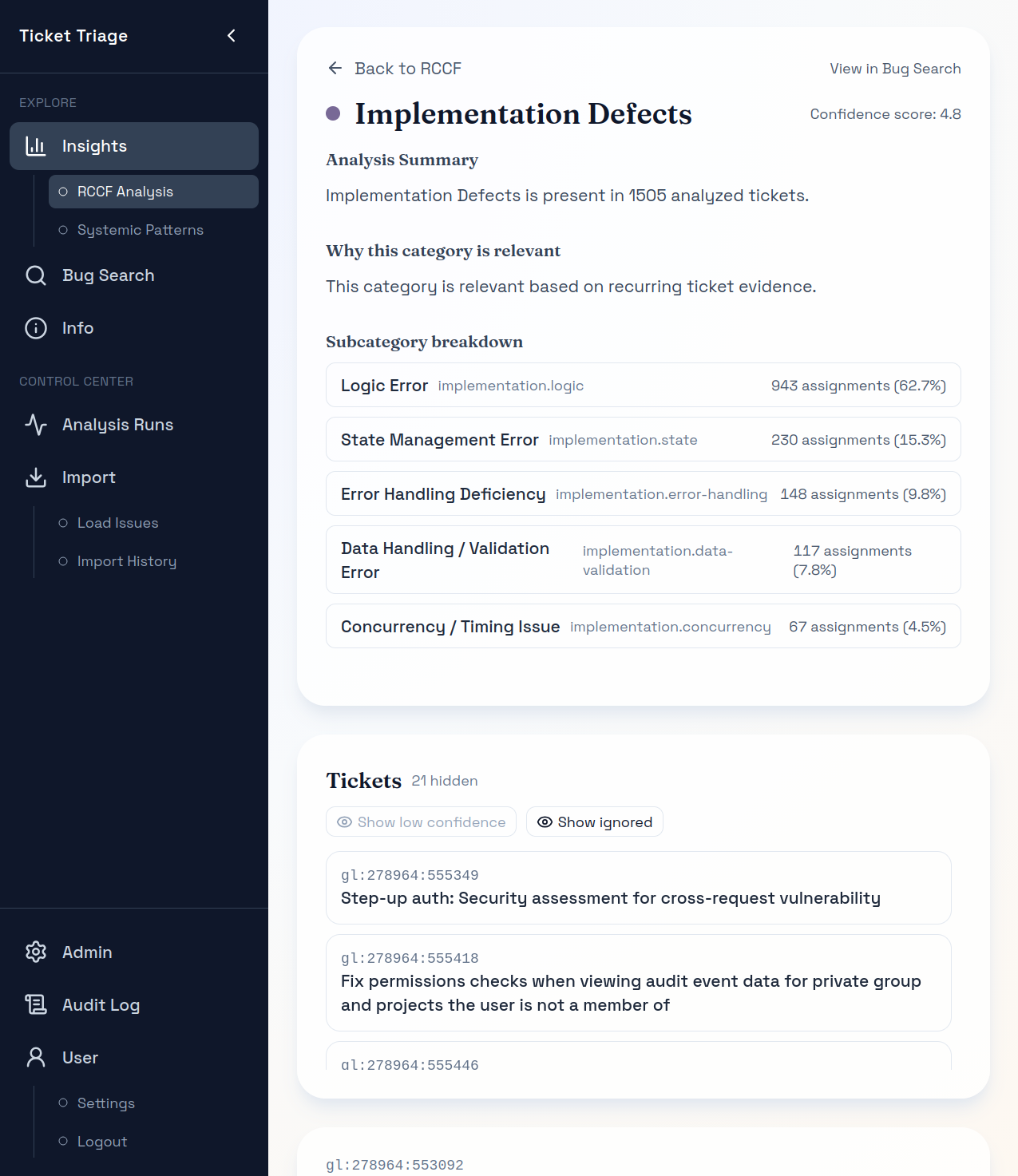
Traceability
Review the reasoning, subpatterns, and linked tickets behind each pattern.
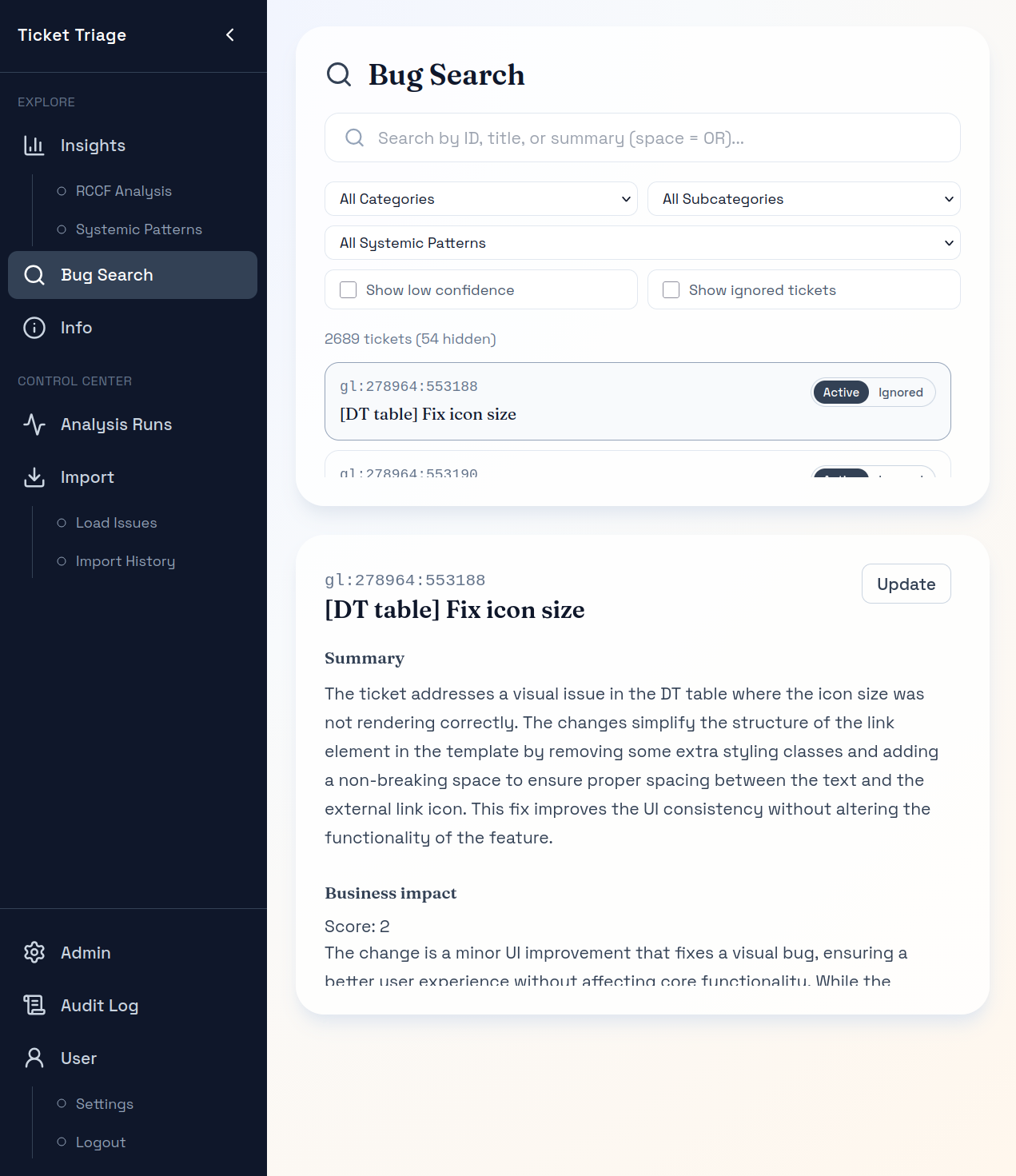
Grounding
Open individual tickets to confirm the analysis reflects real context.
Why teams trust it
Pilot analysis
Low-risk scope, high-signal output.
Best fit
Included in the pilot
Pilot scope: Single system or team, GitLab issues, one code host, single analysis run, 2 weeks read-only access and a report
Trust model: Runs in your environment, with your own OpenAI access (BYOK).
Additional connectors: Alternatives to OpenAI or GitLab, scoped individually
Pricing: On request <no value>
FAQ
Those tools help teams monitor live systems, inspect code-level issues, or surface engineering signals. Ticket Triage answers a different question: using your historical GitLab bug and fix data, what keeps recurring, what is likely driving it, and where should you intervene first? It is evidence-backed prioritization for recurring defects, not another dashboard.
For the current standard pilot, GitLab is the required ticket and code source. The analysis is built around GitLab Issues and linked code changes, with OpenAI used through BYOK. Other connectors are outside the standard scope today and would need separate scoping.
You get an evidence-backed view of the dominant recurring defect patterns in the selected scope, the cross-ticket patterns that explain the most engineering drag, the code areas where defects concentrate, and traceability back to the underlying tickets and code changes. The practical outcome is a clearer decision about where quality and reliability work should go next.
It is a product-led pilot. The software performs the analysis and gives your team read-only access to explore the findings in product. The engagement adds the fixed scope and structured sessions needed to get one selected team or system to a decision without turning it into a broader rollout or consulting workstream.
Setup is intentionally narrow: one selected team or system, one historical GitLab-backed dataset, defined access, and one scoped analysis run. We start with a short data-qualification step, then deliver the findings in product rather than setting up ongoing monitoring.
Because the findings are reviewable. You can trace them back to the underlying tickets, linked merge requests, and code changes in the product. The goal is not to replace team judgment, but to make quality discussions less anecdotal and more evidence-backed.
The pilot is designed to be low-footprint: single-tenant, customer-hosted or customer-controlled deployment with BYOK, fixed scope, and clearly bounded data access for the selected team or system. That makes the pilot easier to review than a broader rollout.
No. The pilot highlights where recurring defect patterns concentrate and surfaces the highest-priority intervention areas with suggested directions. Your team decides what to prioritize, how to act, and whether to act at all.
Because it uses GitLab history you already have to produce an evidence-backed prioritization decision without requiring a broader rollout. It helps teams move from recurring bug pain to a defensible next step.
The best fit is one clearly scoped GitLab-backed team or system with roughly 6-12 months of relevant bug history and at least some meaningful linkage to merge requests or commits. The clearer the ownership and history, the stronger the insight quality.
Ready to focus on leverage?
Start with one team or system, review recurring patterns with traceability, and leave with a shared evidence base for the next decision.